
Welcome to Day 2 of the 100 Days of Multi-Cloud Challenge!
After mastering AWS IAM on Day 1, today we dive into Azure Entra ID + RBAC (formerly known as Azure Active Directory) and Role-Based Access Control (RBAC) — two critical concepts every Azure Cloud Engineer must know.
By the end of this article, you’ll be able to create Azure users, groups, and assign RBAC roles in a real-world scenario, just like a professional cloud engineer.
☁️ What Is Azure Entra ID?
Azure Entra ID is Microsoft’s identity and access management (IAM) service that powers authentication and authorization across Azure, Microsoft 365, and other Microsoft cloud services.
Think of Entra ID as your organization’s central identity store — where all users, groups, applications, and permissions are managed.
🔑 Key Identity Types in Azure Entra ID
1️⃣ Users — Real people who log into the Azure portal or use CLI.
2️⃣ Groups — Collections of users to simplify permission management.
3️⃣ Applications / Service Principals — Identities used by apps or services for automation.
💡 In short, Entra ID = Identity Management, while RBAC = Permission Management.
🧩 What Is Azure RBAC (Role-Based Access Control)?
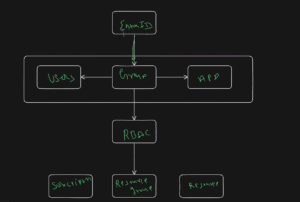
RBAC (Role-Based Access Control) is a system that defines who can perform what actions on which resources.
It allows you to assign permissions at multiple levels — from the entire subscription down to a single resource.
🔍 AWS IAM vs Azure RBAC — A Quick Comparison
| Feature | AWS IAM | Azure RBAC |
|---|---|---|
| Scope | Account-level | Hierarchical (Subscription / RG / Resource) |
| Permissions | JSON-based (Allow/Deny) | Predefined Role Templates |
| Identity Store | IAM | Entra ID |
| Policy Style | Flexible but complex | Structured and simplified |
| Access Model | IAM Roles | Managed Identities |
👉 In simple terms:
AWS IAM = Policy-based access control
Azure RBAC = Role-based access control
🧠 Why RBAC Matters in Azure
In enterprise environments, you rarely assign permissions directly to users.
Instead, you assign roles to groups, which gives you:
Easier management at scale
Consistent access control
Less room for human error
Simplified onboarding/offboarding
💬 Example: Assign “Contributor” role to the Developers group → all developers get access automatically.
🧰 Azure Entra ID Best Practices
✔ Use groups instead of assigning roles directly to users
✔ Always enable Multi-Factor Authentication (MFA)
✔ Apply the Principle of Least Privilege
✔ Implement Conditional Access policies
✔ Use Managed Identities for apps and automation
✔ Follow Zero Trust principles — never assume safety by default
🖼️ Visualizing Azure RBAC Architecture
🧪 Hands-On Project — Azure RBAC Setup
Let’s set this up step by step in your Azure Portal.
Step 1 — Create a User
1️⃣ Go to Microsoft Entra ID → Users → New user
2️⃣ Username: john.developer@yourdomain.onmicrosoft.com
3️⃣ Set password → Create user
💬 This user now exists in Azure Entra ID.
Step 2 — Create a Security Group
1️⃣ Navigate to Entra ID → Groups → New Group
2️⃣ Group type: Security
3️⃣ Name: Developers
4️⃣ Add member: John Developer → Create
💬 This allows group-based access management.
Step 3 — Create a Resource Group
1️⃣ In Azure Portal → Search “Resource Groups” → Create
2️⃣ Name: dev-project
3️⃣ Region: any → Review + Create
Step 4 — Assign RBAC Role to Group
1️⃣ Go to Resource Group → Access Control (IAM)
2️⃣ Add → Add Role Assignment
3️⃣ Choose Role: Contributor
4️⃣ Assign to: Developers Group → Save
💬 Now, all users in this group can manage resources within dev-project.
Step 5 — Test Login
1️⃣ Open incognito browser
2️⃣ Login with john.developer@yourdomain.onmicrosoft.com
3️⃣ Access dev-project → ✅ Create VM works
4️⃣ Try subscription-level action → ❌ Access denied
💬 This proves RBAC scope enforcement is working correctly!
🎉 Project Summary
✅ User creation (Entra ID)
✅ Security group setup
✅ Role assignment (Contributor)
✅ Scoped permissions at Resource Group level
✅ Least privilege validation
You’ve just implemented Azure’s identity and access model like a real Cloud Engineer. 🚀
🌟 Real-World Scenario
| Role | Scope | Access |
|---|---|---|
| Developers | Resource Group | Contributor |
| Managers | Subscription | Reader |
| DevOps | Resource Group | Owner |
| Auditors | Tenant | Reader |
This is how enterprises structure access to keep teams isolated and secure.
🧠 Quiz (Challenge Yourself)
1️⃣ What’s the difference between Azure RBAC and AWS IAM?
2️⃣ What is the scope hierarchy in Azure RBAC?
3️⃣ Why is assigning roles to groups a best practice?
4️⃣ What can a Contributor do — and not do?
💼 Interview Questions
If you’re preparing for interviews, check out the detailed
👉 Azure RBAC Interview Questions & Answers
💬 Homework for You
Create your own Managed Identity and assign it a Storage Blob Reader role — then test if your VM can access blob data without any credentials.
🔗 Useful Resources
📈 Key Takeaways
✅ Azure Entra ID = Cloud Identity Platform
✅ Azure RBAC = Role-based permission control
✅ Always use groups, not direct user assignments
✅ MFA + Conditional Access = Stronger security
✅ Follow least privilege & Zero Trust principles
🏁 Conclusion
This completes Day 2 of 100 Days of Multi-Cloud.
You’ve built a secure and scalable identity and access control system in Azure using Entra ID and RBAC.
Next up: Day 3 — Azure Storage Accounts (with Hands-On Project)
Subscribe to the series and continue building your multi-cloud engineering portfolio.
For more information about interview questions and answers Open-source Projects, DevOps and Cloud project, please stay tuned TechCareerHubs official website.

1 thought on “Day 2 — Azure Entra ID + RBAC (Role-Based Access Control)”